
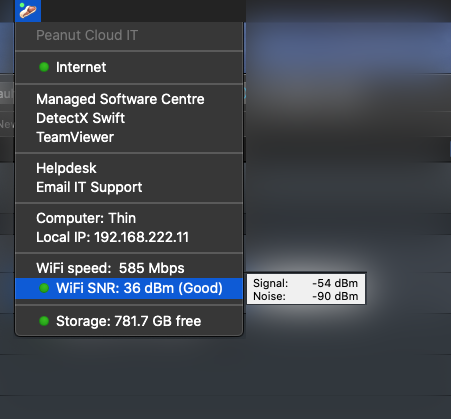
Use this menu to contact support, browse the Helpdesk, check your wifi connection and more.
- Internet - goes red when internet is down. Click to refresh.
- Managed Software Centre - open the Managed Software Centre where you can install and update your computer
- DetectX Swift - scan your computer for malware
- TeamViewer - open TeamViewer
- HelpDesk - browse our online help resources
- Email IT Support - send us an email with automatically generated troubleshooting info
- Computer - displays the computer name
- Local IP - show the LAN IP address of your computer
- WiFi speed - the current maximum speed of your connection
- WiFi SNR - shows the effective WiFi signal strength
- Storage - displays current free space on your internal drive
Note:
- This menu refreshes once every 60 seconds. Click an item to force it to refresh.
- Hover your mouse over an item to reveal additional information.
- Some menu items use a coloured indicator where
- Green = OK
- Yellow = Notice
- Red = Alert
Comments
0 comments
Please sign in to leave a comment.